 YunLab.ai
 Tools I Built on the Side
I built two small tools on the side recently — one I call the AI Quota Dashboard, the other the Task Board. One because I'd lost track of where my AI tool spend was going and how much was left. One because I had no idea whether the cron jobs running on my Mac had actually fired today. Both do the same thing: pull state scattered across many places into one visible spot.
The Task Board — Did Today's Cron Jobs Actually Run?
My machine has a pile of LaunchAgents running — macOS's background services that start at boot. Jiyanran from OpenClaw is running, a few Studio agents are running, Claudio — my AI radio station — is running. Add it all up and there are a dozen-plus scheduled jobs waking themselves up on cue every day. To check which ones succeeded and which ones crashed, I used to open a terminal, run launchctl list, scan a few different log files, and stitch the picture together in my head. If I didn't check, I just assumed everything was fine — until something broke and I'd find out a job had quietly skipped the last five days.
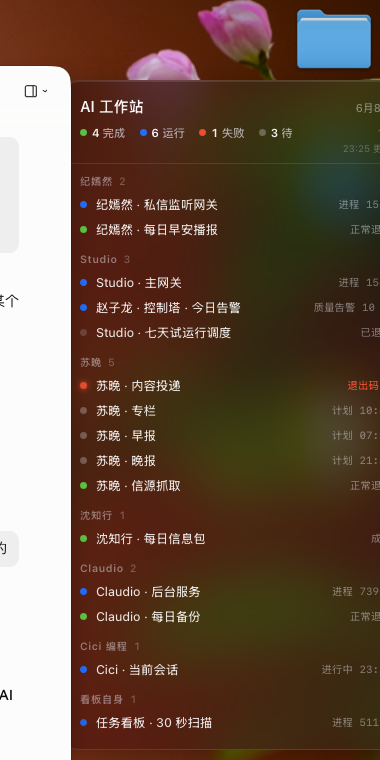
I decided to build a dashboard. Two requirements: first, it had to live on the desktop full-time, no clicking needed to see it. Second, the granularity had to be fine — Suwan has 3 jobs a day, so it has to show 3 rows, not collapse them into a vague "Suwan · OK".
Here's what came out:
How I Built It
Two frontends share one data source. One is SwiftBar — a framework for macOS menu bar tools — running a minimal version at the top of the screen that shows only the most urgent line and expands to the full list on click. The other is Übersicht — a framework for macOS desktop widgets — and that's the card pinned to the top-right of the desktop in the screenshot above. Both frontends read the same state.json, so the numbers can't disagree.
Data flows in from two sources. One is a LaunchAgent that sweeps every 30 seconds — it reads launchctl list to get each job's last exit code and PID state, cross-references an expected-tasks.json file that knows "here's what's supposed to run today", reconciles the two, and writes the result to state.json. The other is a Claude Code hook — at the end of every Cici session I auto-write a "current task" line to the "Cici" row on the board, so the board can show what I'm actually working on, not just "active / done".
For UI I went with macOS system colors for the status dots (system green / blue / red / yellow), SF Pro for the font, and real vibrancy blur. There was a brief emoji-based version in the middle that started bothering me — switching everything to colored dots made it much cleaner.
The Quota Dashboard — Four AI Tools, Four Different Places to Check
The AI tools I use daily: Codex — OpenAI's CLI agent, billed against the ChatGPT Plus subscription's 5-hour window — Claude Code (billed against the Claude subscription), Kimi (subscription), and a few backup relay-service API keys. Each one has a different way to check the balance — Codex via /status in its terminal, Claude via its own /status in another terminal, Kimi via a web dashboard, the relay services via yet another web login.
There's also a hidden pain point for Pro/Max subscribers — you don't know how much of the current 5-hour or 7-day window is left, or when it resets. Getting rate-limited mid-sentence is genuinely annoying.
I decided to build a cross-platform menu bar tool that consolidates all of it. The shape is a menu bar tray — pinned to the top of the screen, one glance shows the most urgent item (e.g. "Codex 5h 90%"), and clicking opens a popover listing every provider's remaining %, reset countdown, and balance. Anything below a threshold fires a system notification.
How I Built It
For the stack I picked Tauri v2 — a desktop app framework (Rust core + WebView frontend) — one codebase ships both macOS and Windows, and the bundle is only a few MB. Data sources break down into four categories by provider:
- Codex (subscription, the most reliable) — read the jsonl files under local
~/.codex/sessions/directly and sum the token usage; the numbers matchcodex /statusoutput. - Claude (subscription) — one path goes through OAuth to grab the official real-time window remaining %, another reads jsonl under local
~/.claude/projects/and computes cost (similar approach to ccusage). - Relay services (API key) — call the site's
/dashboard/billing/subscriptionor/api/user/selfto get the exact balance (USD/CNY). - Kimi / OpenAI official / MiniMax and similar providers with no public balance endpoint — fall back to showing login state and plan expiry.
The privacy boundary is hard: credentials are read locally, sent only to the corresponding official endpoint, nothing is collected, and the whole thing is open-source and auditable. No long-term usage history storage, no account system, no proxying of AI requests — just reading balances.
Engineering-wise it's still in dev — the spec is written, every data source has been verified to actually return data, the UI skeleton is in place, but the Tauri release build isn't out yet. That release is a one- or two-day thing from here.
Both tools are the same idea: take information that was scattered across 4-5 terminal commands, web pages, and log files, and pull it into one always-visible spot. This is a need normal people have too — not just engineers. Phones have always had Weather, Battery, and Calendar widgets, but there's no "how much have my AI tools used today" or "did the automations at home actually run" widget. So I built one.
The Task Board has been live on the desktop for two weeks now and it's holding up. The AI Quota Dashboard's Tauri release should land this week — the next post will probably come with real screenshots.