 YunLab.ai
 AI Workstation · Engineering Retrospective
A little panel, and I've rebuilt it over and over. Someone probably figures, is it really worth it. It is. The first few versions, I couldn't use.
First, what the panel is for. I've got a pile of things running at once. Those OpenClaw agents — Su Wan writing, Ji Yanran running ops, Zhao Zilong watching alerts, each with its own scheduled jobs. Plus my own Claude Code and Codex sessions doing work. Over a day: which one ran, which one finished, which one isn't due yet, which one died. I need one place where I can see it at a glance.
Put plainly, it's one thing: I want to know what's running now, what I've finished, and what's still pending. That's it. (How these two panels first came about, I wrote up earlier. This piece is about why I've kept rebuilding it since.)
That's where the first few versions failed. It looked the part — a row of tasks, a few status dots. But it was fixed; it didn't match what was actually running. A "done" might have a zombie process under it that never exited. An alert that should read "failed," it treated as nothing. The status over on the Claude Code and Codex side was just plain wrong.
It tells me "it's all done," and it isn't. That kind of panel is worse than none. With none, at least I know I have to go check myself. With one that lies to me, I just believe it.
Yesterday it was the widget on my own iPhone that nudged me. The Screen Time one. You open it, and the first thing is a tally: how long today, which apps, over or under. One glance, done. That's what I want. I don't want to read it. I want to glance and move on.
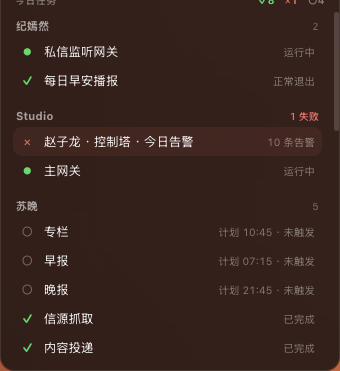
So I rebuilt the task area to match. A tally for the day up top: ✓8 done, ✕1 failed, ○4 not due yet. Below it, grouped by agent, one dot per line. ● live, ✓ done, ✕ failed, ○ pending. See the Studio group flagged "1 failed" — Zhao Zilong threw 10 alerts today, in red. Su Wan's morning and evening briefs are still hollow circles, not due yet. That glance is the one I wanted.
But pretty doesn't help; the dots have to be right. Most of these past days went not into layout but into making every dot stop lying: a clean exit gets corrected to "done"; an alert that should fire flips to "failed"; a zombie that never exited gets thrown out instead of hanging there pretending to be "live."
The quota half, same problem. For a couple of days the Claude card kept showing "throttled," and I nearly believed it — figured my quota had run out. I dug to the bottom: the token in the keychain had expired six and a half hours earlier. The panel was hammering a dead ticket over and over, and got flagged as abnormal traffic and rate-limited. That "throttled" on the card was fake. The truth was I was jamming an expired ticket through the gate. So, another stack of fixes: spot the expired token and stop hammering it; on a real 429, back off five minutes; persist the last good quota so a restart doesn't lose it; turn those bare 429 / 401 codes into plain words.
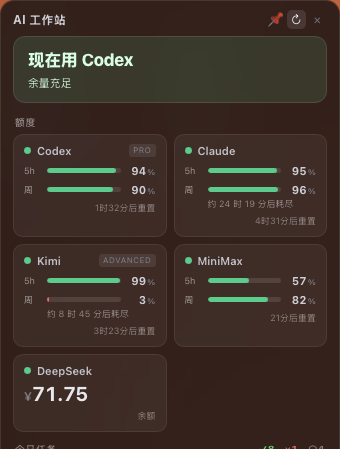
I keep rebuilding it for one thing: I want it to be true. A fake panel is worse than none. Pretty is useless; if the status is wrong, it's just an ornament. It's the same as that AI in my last piece — mouth full of "all good," already long gone. That's the thing I fear most: it lies to you with a straight face, and you believe it.
I'm still on this; it's not where I want it. But why I'm doing it, I've got that clear, and it won't drift again.
I don't want a pretty ornament sitting there. I want one glance — and every dot on it has to be something that's really running right now.