 YunLab.ai
 CHAPTER 01 · 1.3
Download, installation, updates, and first launch
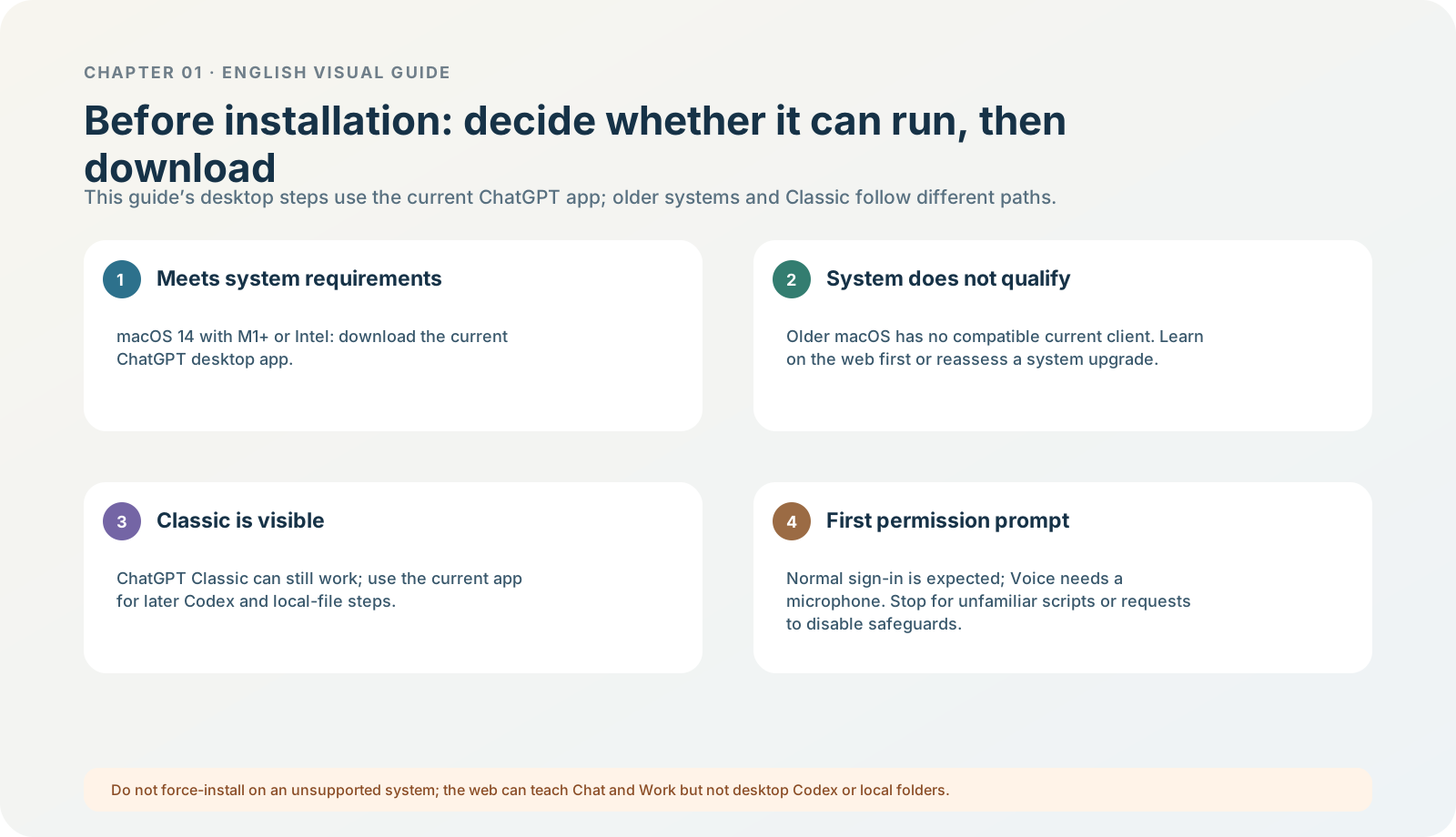
Figure 1-3 · DIA-01-V2-10. System, client, and permission checks before installation (teaching diagram, not a live-product screenshot).
This section answers: When installation, updating, or sign-in fails, how can you avoid gambling on “reinstall everything”?
Why the order matters
Installation problems come in at least three forms: it was not installed correctly; it is installed but will not start; or it starts but sign-in or a feature is unavailable. Mixing them together easily causes needless cleanup, repeated downloads, and mistaken authorisations. For the current desktop app, use ChatGPT desktop app for the sequence of download, sign-in, choosing a work location, and the first message. If buttons or product surfaces differ, first check current official documentation and in-app guidance.
Before installation: answer “can my computer use it?” in one minute
The later steps in this book—opening a local folder, using Codex, and choosing local work in Work—refer to the current ChatGPT desktop app, not any older client or browser tab named ChatGPT. On a Mac, open the Apple menu → “About This Mac” and record only two things: the macOS version and the chip/processor. The current official requirement is macOS 14 and Apple Silicon (M1 or later) or Intel; older systems do not have a compatible current desktop version. System requirements
| Fact you see | What it means | How to continue in this chapter |
|---|---|---|
| macOS 14 and M1 or later / Intel | You can download the current desktop app and continue with this book’s desktop steps. | Download only from the official page, then install as described in this section. |
| System version below macOS 14 | Do not force-install it, look for a “compatibility patch”, or turn off system protection. | You can first learn Chat on the web; if your account is eligible, you can also learn Work. Mark the Codex and local-folder steps as “not verified on this machine”. |
| You see both ChatGPT and ChatGPT Classic | The current app may coexist with Classic. Classic can still be usable, but it is not the main interface for this book’s later Codex / agent operations. | Record both names. To follow this book’s local-project, Codex, and Work steps, open the current ChatGPT app. |
| Only web or mobile is available | You can hold discussions and complete some learning, but that does not mean you can reproduce desktop local-file steps. | Do not force web/mobile menus onto Codex; Codex cannot be opened as an available product surface on the web or mobile. |
First-launch prompts: which are normal and which require a stop
Normal, but inspect them: a sign-in redirect initiated from ChatGPT; a file-access request that appears after you deliberately open the exercise folder; a microphone request after you deliberately select Voice. Do not treat these as default required installation steps: screen and system-audio recording, accessibility, browser sign-in state, or access to the entire computer. Assess each only when you explicitly enable the matching capability. If an alleged “installer” asks you to disable system security, run an unknown script, enter a system password unrelated to ChatGPT, or authorise your whole Documents/Desktop folder, cancel immediately and do not continue troubleshooting.
Follow along: a three-stage installation check
- Before installation: enter only from OpenAI’s official download page; check system requirements and whether it is the current ChatGPT app; close pages for unknown “accelerators”, cracked packages, or activation packages. Expected result: you know whether this machine is eligible and where the installer came from.
- During installation: accept only the installation steps normally shown by the system. If the flow suddenly asks you to disable a system security feature, run an unknown script, or provide a password unrelated to installation, cancel the flow. Expected result: you do not expand permissions just to “get it installed quickly”.
- After first launch: record the app name and version first, then inspect update prompts, and sign in last; do not pre-approve microphone, screen recording, or accessibility. Expected result: when something goes wrong, you can distinguish installation, launch, identity, and later feature-permission problems.
When to update, and when to leave it alone first
| Symptom | Priority action | What not to do immediately |
|---|---|---|
| The app will not start at all | Record the error, system version, and app version. | Delete history and settings. |
| A tutorial has an entry point that you do not have | Check the version, account, workspace, and release notes. | Assume that “it must be reinstalled”. |
| The official source explicitly fixes a compatibility or security problem | Record the old version, update, then confirm the new version. | Skip recording the before/after state. |
| Only an unfamiliar site provides a “new version” | Leave it and return to the official entry point. | Download or run an unknown installer. |
Practise the judgement with the case
The North Shore Reading Club files have not been uploaded, and you do not need them to test installation. The minimum evidence of a successful installation is simply that the app opens, you can record its version, and you can reach the sign-in or welcome screen. Do not drag in exercise files merely to “try it out”.
Minimum exercise and acceptance
Write down one fact to record “before installation” and one “after launch”.
Pass condition: you can troubleshoot “download source, launch, sign-in, feature visibility” separately. Common pitfall: clearing app data or arbitrarily downgrading/upgrading when an entry point is missing. Next: identity confirmation comes before model selection, because it determines what you can see.