 YunLab.ai
 CHAPTER 01 · 1.22
Your First Safe Task: Complete a Read-only Exercise from Scratch
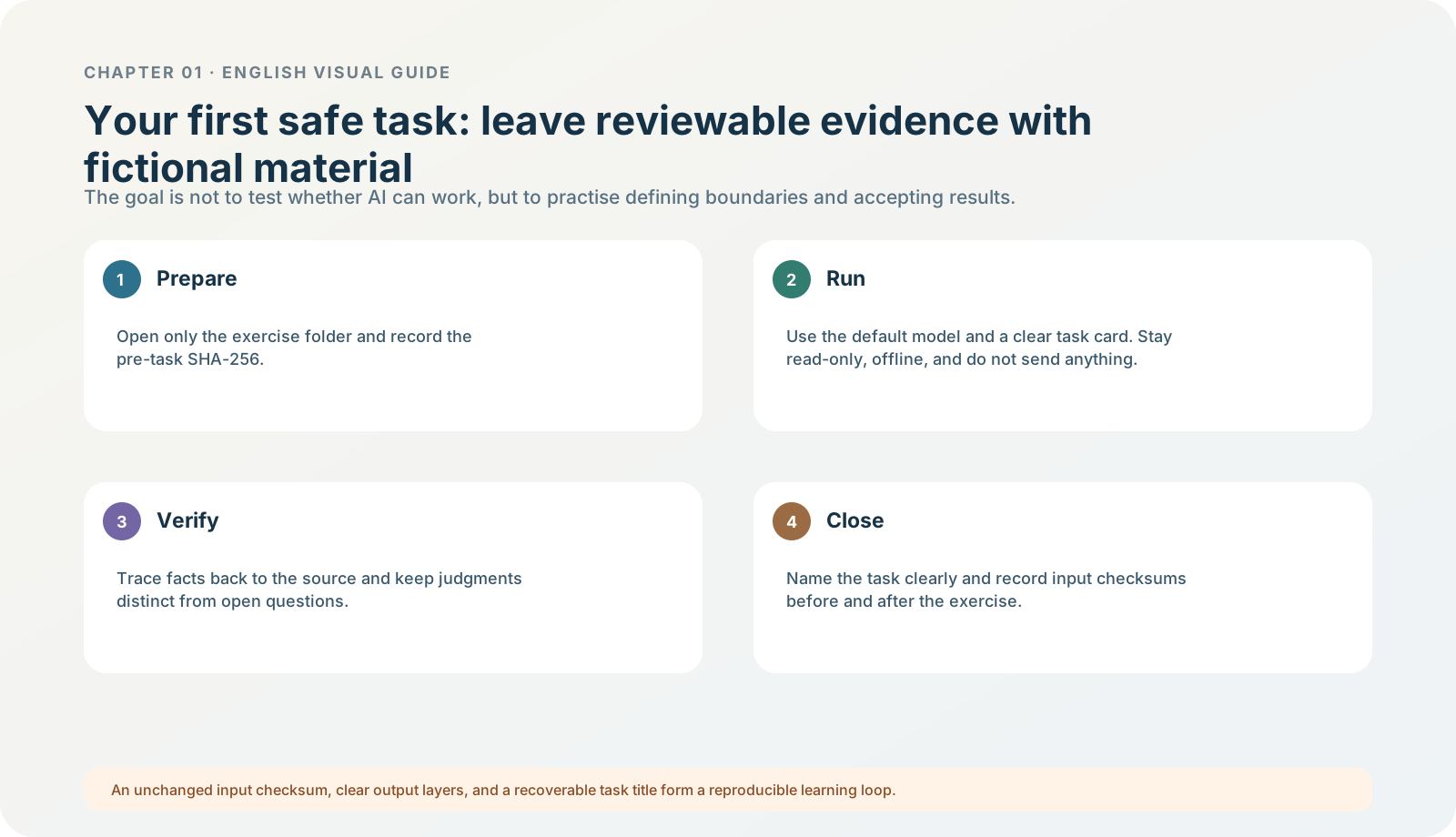
Figure 1-22 · DIA-01-V2-08. Evidence chain for the first safe read-only exercise (teaching diagram, not a live-product screenshot).
This section answers: How do I truly complete an acceptable task without touching real material or retaining only a vague impression that “it seemed to have done it”?
Exercise goal and boundary
This section directly uses the Chapter 01 safe read-only exercise pack, specifically brief.md and meeting-notes.md. They are entirely fictional materials. The task’s only goal is to produce three parts in English: confirmed facts / judgments / open questions.
The prohibitions are part of the task too: do not modify, create, rename, move, or delete any file; do not access content outside the folder; do not use the web; do not send, publish, or connect to an external service; do not output a file.
Standard entry: open the exercise folder in Codex first
If Codex is currently visible in your desktop app, the standard entry for this section is: choose Codex in the product picker, then use Open folder (Cmd/Ctrl+O on macOS / Windows) or create a new local project and choose a folder that contains only this exercise pack. Never choose Documents, Desktop, Downloads, or a real project root. Begin the new chat inside this restricted folder and keep the composer permission at Ask for approval. This step is itself an exercise: confirm exactly how large the real-file scope allowed for this task is. ChatGPT desktop app commands; Permissions
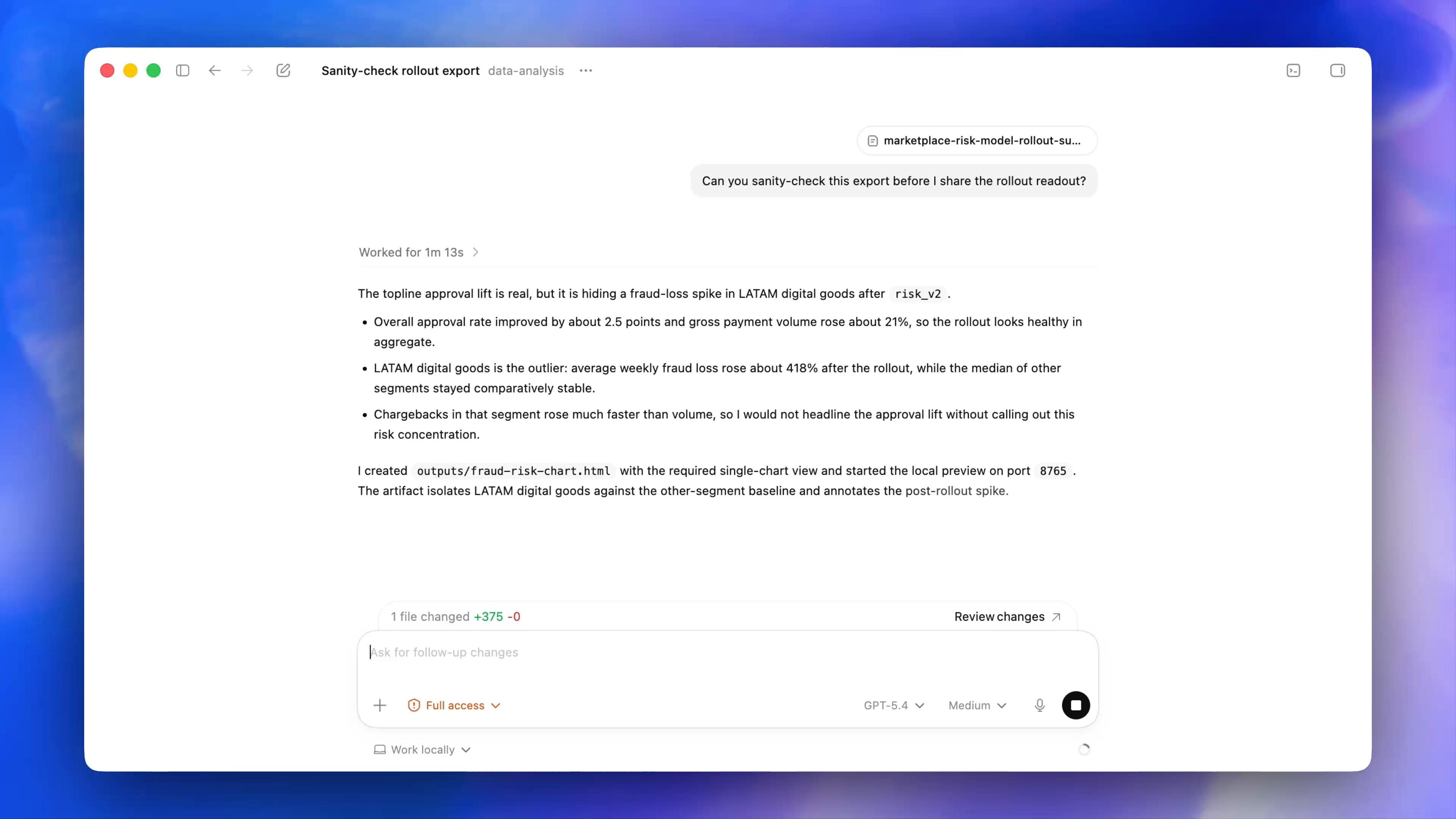
Figure 1-22A · In the current official desktop demonstration, permissions, model, reasoning, and Work locally controls can appear near the composer. It helps you recognize the control area this chapter’s exercise uses. Full access and “1 file changed” in the image are official demonstration states, not settings for this exercise. The exercise still begins with Ask for approval and a read-only scope.
Only if Codex is not currently available, or your workspace does not permit a local folder, use ChatGPT → Work as a text-only alternative exercise: manually provide the content of brief.md and meeting-notes.md, or those two fictional files, and write “this run did not verify the local-folder boundary” in the learning record. The alternative still trains fact classification, but cannot replace the local-scope learning goal in Codex. If Work shows Work locally / Cloud, explain before choosing why real local files are not needed or why the task should not continue into Cloud. If Work is not visible either, use ChatGPT → Chat; paste only the text of the two fictional materials and record “this run did not verify the Work / Codex and local-folder boundary.” You can still complete the fact, judgment, and open-question learning goal; you do not need to buy or configure an API key for Chapter 01.
Before you start: prepare input evidence (basic and advanced)
- Open the exercise pack and read
README.mdandacceptance.mdfirst; do not read only this tutorial page. - Confirm that you will use only
brief.mdandmeeting-notes.md. - Basic version: write in the learning record, “the two input files existed before starting; the exercise pack contains a baseline checksum file.” This step does not require terminal knowledge.
- Advanced verification (optional): in a macOS terminal, enter the exercise folder and run:
shasum -a 256 brief.md meeting-notes.md- Save the two resulting checksum lines in the learning record, or compare them with
checksum-baseline-sha256.txtin the exercise pack. - Record the date, task title, and current mode / model at this point, if visible.
Expected result: you have evidence of “what the inputs were before the task began.” shasum only calculates checksums; it does not modify files. It is advanced verification that raises confidence, not a barrier that keeps beginners from starting. At minimum, the basic version requires reopening the two input files afterward and confirming that their content has not changed; add before-and-after hash comparison when possible.
Execute: start the task with a controlled task card
Prefer creating the task in a Codex task already limited to the exercise pack. If using the Chat / Work alternative, explicitly provide only the two fictional inputs. Use the prompt in acceptance.md and give the task this name:
Chapter 01|Read-only Exercise|North Shore Reading ClubBefore submitting, read three things again: only two files are permitted; web access / writing / sending are prohibited; the output is only three text sections. If the interface asks at this stage to open a larger folder, connect a browser, or provide any credential, cancel that request and return to the task card.
While it runs: observe only three kinds of evidence
| What you see | Correct action | Why |
|---|---|---|
| Text is being generated normally | Wait for completion, then check every acceptance item. | Running does not mean it already passes. |
| It requests web access, an additional file, writing, or sending | Stop / refuse; do not grant new authorization. | It clearly crosses this task’s boundary. |
| The output treats a suggestion / undecided item as already decided | Point to the specific sentence and request a repair only to fact classification. | This is a verifiable quality problem; “make it better” is not enough. |
After it finishes: four acceptance checks
Open acceptance.md and check each item:
- Does the output contain exactly the three parts “confirmed facts / judgments / open questions”?
- Does it avoid writing “extend to 60 minutes,” “use a new video platform,” or “whether to arrange a helper” as already decided?
- Does it avoid claiming it created, modified, accessed another directory, or used the web?
- Advanced verification: run the checksum command again. Are the two lines exactly the same before and after? If you have not used a terminal, reopen the two files and compare their content item by item, and truthfully write “no hash comparison was performed” in your learning record.
Then compare it with the reference acceptable output. It need not be word-for-word identical. There are only two hard standards: confirmed facts, judgments, and open questions are not mixed; the input files have not changed.
How to correct a failure instead of redoing everything
| Failure point | Bounded repair prompt |
|---|---|
| A suggestion is written as fact | “Repair only fact classification: remove every confirmed fact that cannot be supported by the input files.” |
| An open question is missing | “Keep the three-part structure unchanged; add only items that are explicitly undecided in the inputs.” |
| Format is confused | “Do not add any fact; only rearrange into three parts and label judgments.” |
| It requests permission beyond scope | Do not continue this task; preserve the prompt text and return to 1.21 for a boundary judgment. |
Minimum exercise and acceptance
Complete one read-only exercise, then explain in one paragraph which question is fact, which is judgment, and which remains to be confirmed. If you completed the advanced before-and-after checksum match, record that as well.
Passing standard: you have retained the title, input boundary, output, and acceptance table; advanced completers also have before-and-after checksum evidence. Common pitfall: mistaking a Chat / Work text exercise for verification of a local-folder boundary, or judging only whether the result reads smoothly while ignoring whether a file changed or a fact crossed the boundary. Next: if you cannot find, see, or complete a step, troubleshoot by failure category rather than changing settings at random.