 YunLab.ai
 CHAPTER 01 · 1.9
Model selection: understand first, then choose
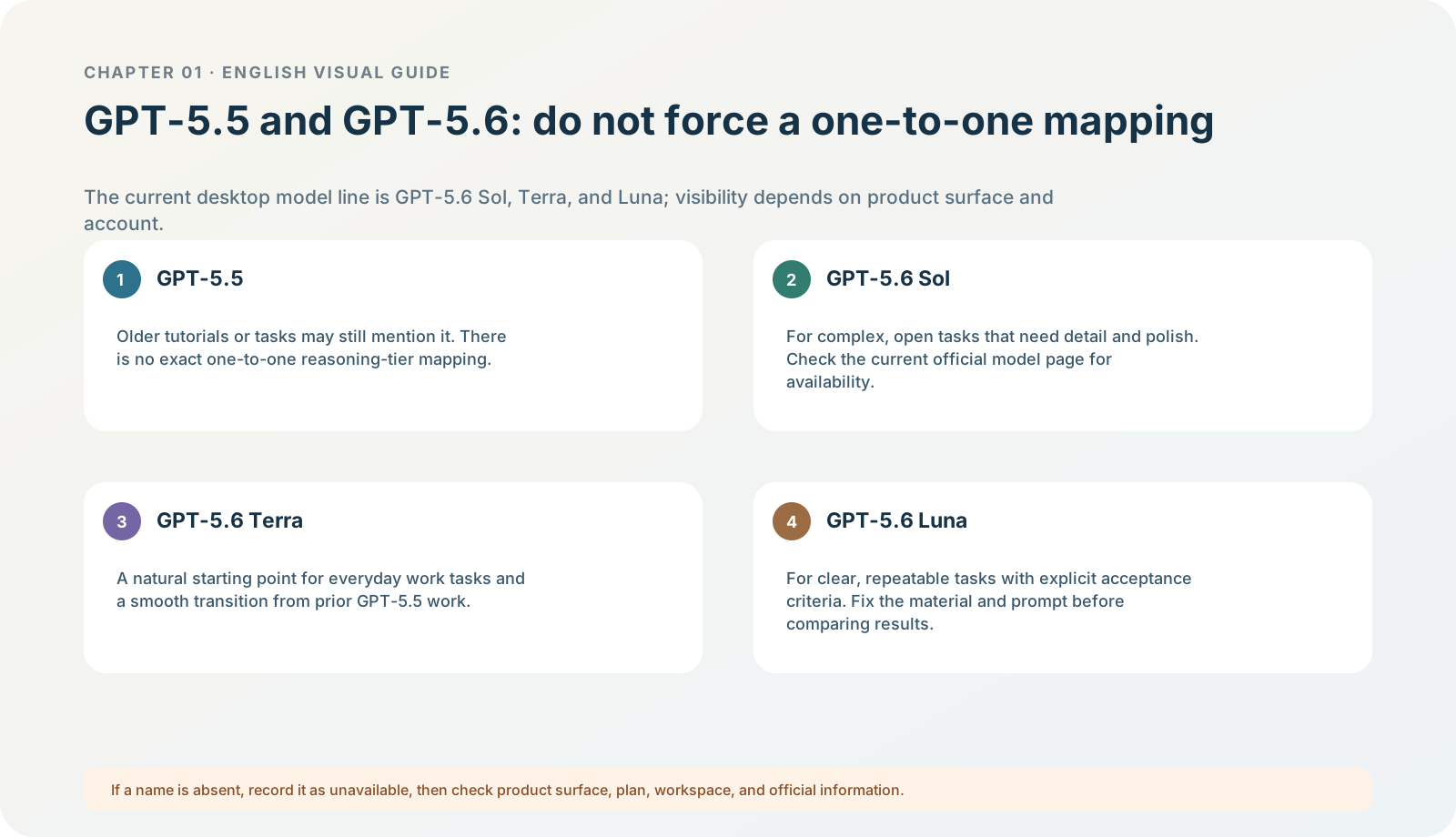
Figure 1-9 · DIA-01-V2-04. A relationship map for GPT-5.5 and the current GPT-5.6 Sol / Terra / Luna (teaching diagram, not a live-product screenshot).
This section answers: What is the difference between GPT-5.5 and GPT-5.6? How should Sol, Terra, and Luna be chosen?
The conclusion first: a model name is not a universal leaderboard
Model selection has at least three layers: what the model family is, what display name the current product uses, and what your account can actually see. Mixing these layers creates questions that cannot be acted on directly, such as “why can’t I see the model in someone else’s screenshot?”, “does 5.6 replace 5.5?”, or “which is always best?”
The key correction for the current desktop app: do not assume GPT-5.5 remains a current button that everyone must be able to see and switch directly. OpenAI’s current desktop model guide describes Codex’s main line as GPT-5.6 Sol / Terra / Luna: default Power uses gpt-5.6-sol with Medium; adjust toward Smarter / Faster when needed, or choose a specific model and reasoning tier in Advanced. OpenAI also explicitly states that GPT-5.5 and GPT-5.6 reasoning tiers do not map exactly one to one; Terra is the natural starting point for everyday work that would previously have gone to GPT-5.5. Models
Layer one: the correct difference between GPT-5.5 and GPT-5.6
| Question | GPT-5.5 | GPT-5.6 family (the current desktop main line) | Conclusion you should not draw |
|---|---|---|---|
| Correct place in the current product | A previous-generation reference you may see in old tutorials, old tasks, or configuration. | Sol / Terra / Luna are the main line of current Codex model selection. | “5.5 and 5.6 are side-by-side choices in every interface.” |
| What suits initial use | Use it to understand old records; do not force an old entry point back for this chapter. | Sol suits complex open questions; Terra suits everyday tool collaboration; Luna suits clear, repeatable high-volume work. | “Every task must use Sol.” |
| How to judge whether switching is worthwhile | First see whether the current result stays in scope, is accurate, and has usable structure. | Compare once with the same material, same prompt, and same acceptance table. | “A larger number in the name automatically fits better.” |
| Visibility | Affected by client version, sign-in method, and local configuration. | Affected by plan, workspace, rollout, and current product surface. | “If a friend has it, I must have it too.” |
The point is not that GPT-5.6 is “always better”. It is that model controls in a new interface change with the product and release cadence, so an old GPT-5.5 tutorial cannot replace the current selector on your screen. In the beginner stage, clearly writing the goal, material scope, and acceptance usually improves the result more than blindly changing models.
Layer two: what Sol, Terra, and Luna each solve
| Name | Current official positioning | Tasks suitable to compare first | Cost the reader should record |
|---|---|---|---|
| Sol | Prioritizes detail and polish; handles complex, open, or high-value tasks. | Complex code, deep research, and long tasks that need judgment and completeness. | Waiting and usage may be higher; boundaries must still be explicit. |
| Terra | A practical everyday generalist / workhorse. | Everyday workflows that need quality and tool collaboration but not all of Sol’s depth. | It is not “the low-spec option”; it is a natural comparison starting point when migrating everyday work from old GPT-5.5. |
| Luna | Prioritizes clear, repeatable work. | High-volume tasks with explicit standards, such as extraction, classification, transformation, and structured summary. | Establish clear acceptance first; do not treat high-volume-task results as a quality benchmark for complex open questions. |
These names can appear in different locations: the current desktop app puts visible model and reasoning controls below the composer; ChatGPT, Work, Codex, CLI, and API will not have exactly the same visible range. If your interface lacks a name, record “not currently displayed” first, then check the product surface, workspace, and official model page; it does not mean installation failed. Models
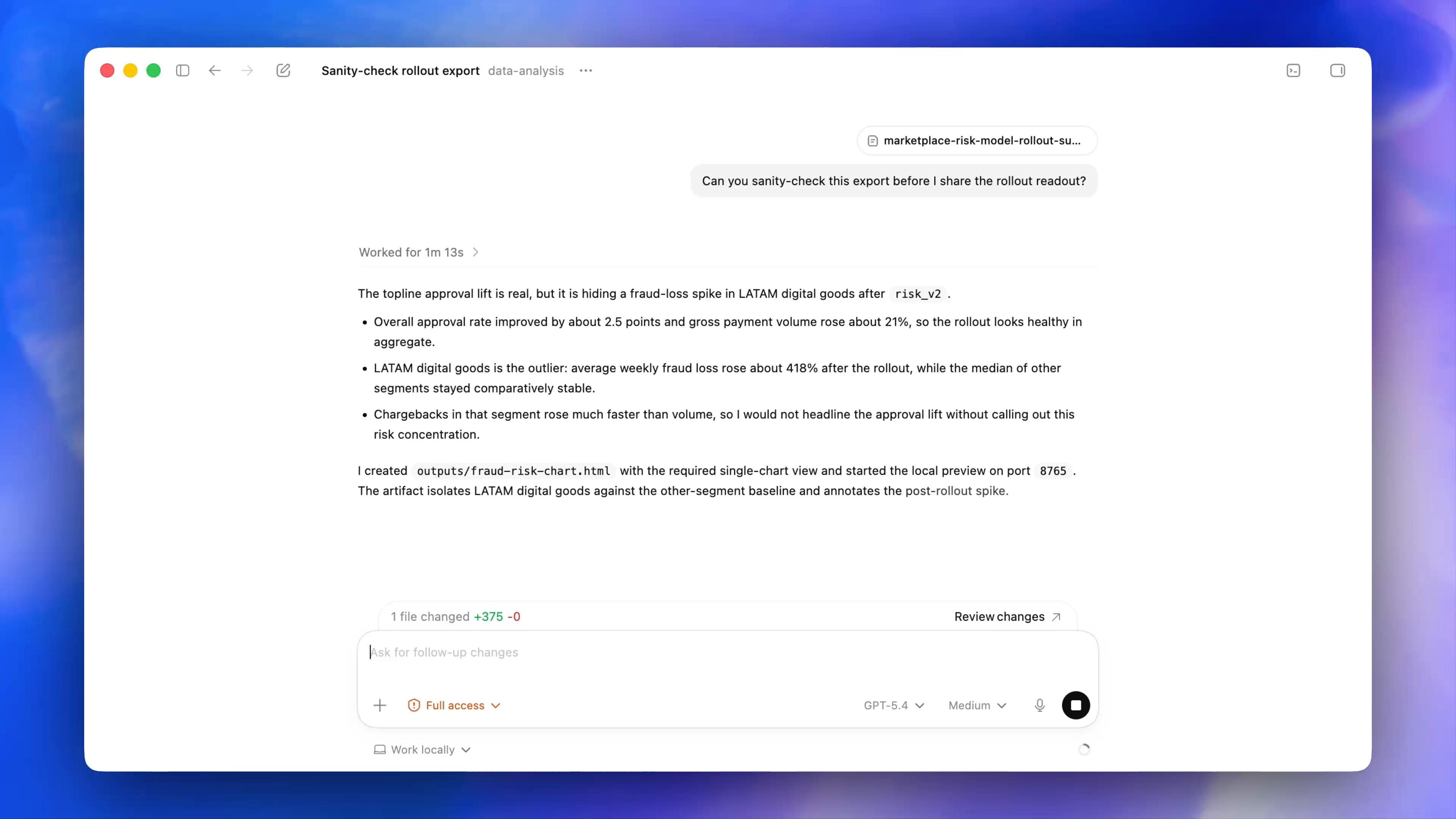
Figure 1-9A · CUR-01-12-01. A public current desktop demonstration frame from OpenAI (verified 2026-07-30; source page). Model and reasoning controls appear together on the right of the composer, with Work locally at the bottom.GPT-5.4andMediumin the screenshot are official-demo state used only to locate the controls; they are not a list of models currently available for this chapter.
What you will see: read four items in the selector first
In the model/reasoning controls of the current app, read four things first:
- The currently selected name. Record the display name, rather than guessing from color or position.
- The current reasoning/speed tier. Model and effort level are two variables; the next part covers this separately.
- The current run location. If Work locally / Cloud appears, decide first whether the task needs local files or apps.
- Eligibility messages. If it says “unavailable”, “upgrade required”, “managed by workspace”, or “rolling out later”, record it as shown.
Do not turn one screenshot into “all accounts have these models”. Any model list in a tutorial should carry its verification date, product, plan, and workspace conditions.
Follow along: the four-step model-selection method
- Write the task question first. For example: do I currently care more about speed, long-material understanding, factual rigor, code collaboration, or quality of expression?
- Complete a low-risk task with the default/recommended option first. Do not change the model, prompt, or material.
- Switch only after finding a describable problem. For example, “it missed constraints from two materials” or “the structure does not meet the three-section output”, rather than “it does not feel smart enough”.
- Change only one variable at a time. Keep material, prompt, output format, and acceptance table fixed; change only the model or effort tier.
Expected result: your record can say “for this North Shore Reading Club task, model B was more stable on factual boundaries / showed no clear gain”, rather than “B is always stronger than A”.
Running case: one safe model comparison
First complete the North Shore Reading Club read-only task with the current default. If it already separates facts, judgment, and questions to confirm accurately, stop there. Only if it writes “extend to 60 minutes” as decided should you copy the same prompt, the same two-file input, and the same acceptance table to another currently visible model. Compare four items:
| Comparison item | Specific question |
|---|---|
| Scope | Did it read outside the folder, suggest web access, or propose an external action? |
| Facts | Did it present a suggestion or unresolved item as decided? |
| Structure | Is it divided into exactly three parts, with judgment explicitly labelled? |
| Cost | Do additional waiting and usage buy a visible quality improvement? |
Minimum exercise and acceptance
Fill in: Evidence that the default model is insufficient is ______; the next variable I will change is ______; I will use ______ to judge whether it is better.
Reference-answer example: “It writes an unresolved item as fact; change only the model; compare factual boundaries, output structure, and waiting/usage.” Common pitfall: treating GPT-5.5 and GPT-5.6 as a “must replace old/new version” relationship, or comparing several models simultaneously with different prompts. Next: choosing a model is not enough; reasoning effort, Max, and Ultra are another selection layer.