 YunLab.ai
 CHAPTER 01 · 1.10
Reasoning effort, Max, and Ultra
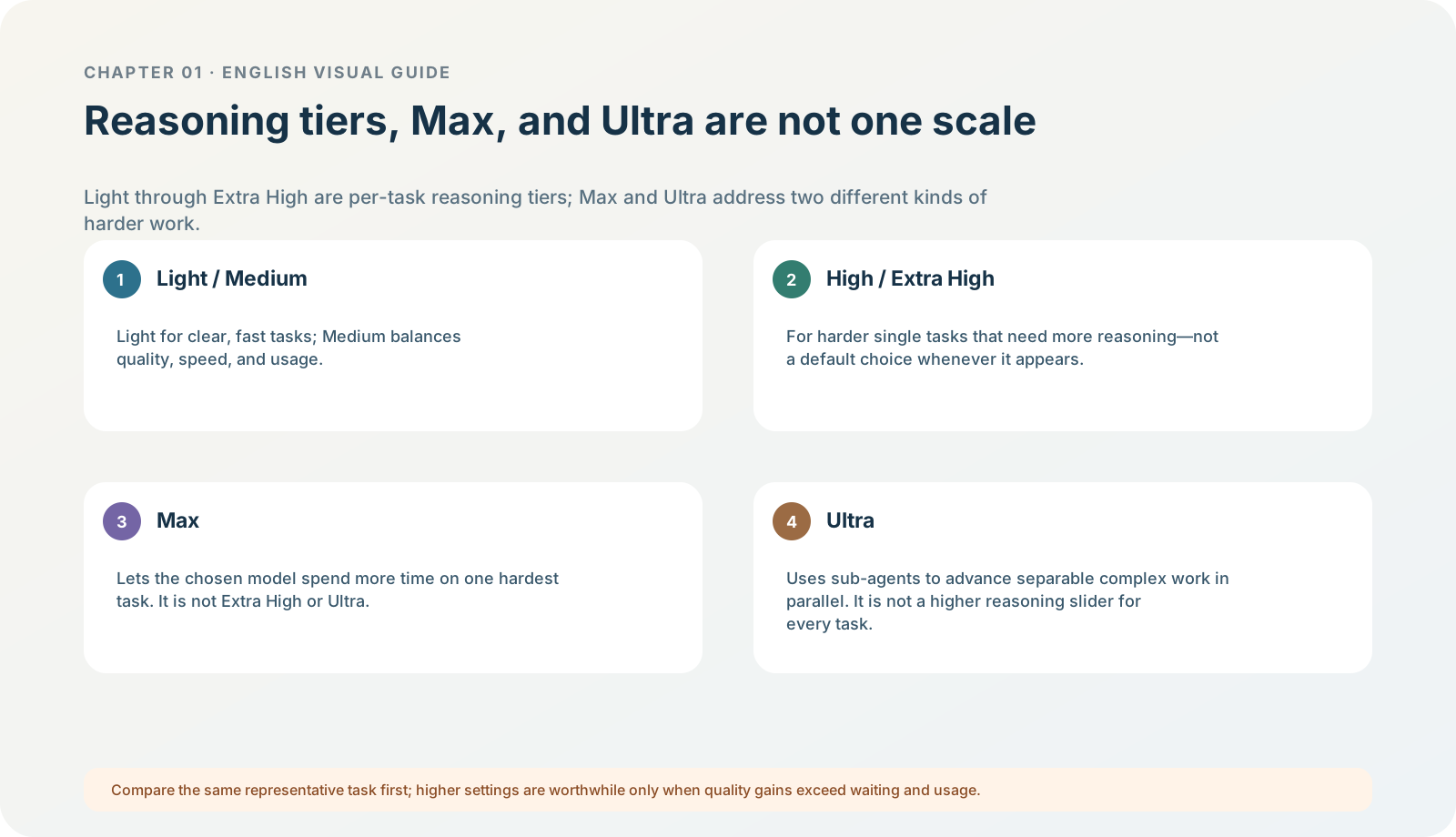
Figure 1-10 · DIA-01-V2-05. Current hierarchy boundaries among Light–Extra High, Max, and Ultra (teaching diagram, not a live-product screenshot).
This section answers: Are light, medium, high, extra high, max, and Ultra all points on the same low-to-high scale?
The most important answer first: they are not one single scale
This must be clear: reasoning tiers, Max, Ultra, and API parameters in the current desktop app are not a one-to-one table. When you hear “light, medium, high, extra high, max, Ultra” in a Chinese interface, first ask “at which product layer does it appear?” Do not arrange them directly into a global, universal ruler.
| Term you may see | Correct understanding in the current desktop app | Difference that can currently be stated rigorously | How a beginner should use it | Do not infer |
|---|---|---|---|---|
| Light | A lower reasoning tier in the current desktop app, Work, and IDE; the CLI commonly calls it Low. | Suited to clear-scope, fast, lower-cost tasks. | Use for short summaries, explicit extraction, and defined checks. | “Light is low in every product, or it must be the default.” |
| Medium | The balanced tier in current model controls. | A tradeoff between speed and deeper planning; OpenAI recommends beginning with default / Medium. | Multi-constraint organization, initial analysis, and a first verifiable task. | Identical names necessarily mean identical internal parameters. |
| High | A deeper reasoning tier in current model controls. | Suited to difficult work with many steps, sources, or tradeoffs. | Only compare the same task when reproducible omissions, factual confusion, or failed complex-code explanations appear. | Every task becomes better merely by going higher. |
| Extra High | One of the highest regular reasoning tiers in current model controls. | Gives a single task further room for planning and checking. | Use only when the same-task comparison at High still shows a clear reasoning shortfall. | It inherently maps one to one to API xhigh, or every account can see it. |
| Max | Extra reasoning time for one selected model, not a translation of Extra High. | Suited to the hardest single problems where quality matters far more than waiting and usage; if unavailable, OpenAI says it must first be enabled in app settings. | Compare one representative hard problem with Extra High first, then decide whether it is worthwhile. | It is the everyday default, or it is the same as Ultra. |
| Ultra | Uses multiple subagents in parallel for complex work that can be split up. | It goes beyond a single agent “thinking longer”; it suits large work divisible into meaningful subtasks. | Use only for work where you can state how subtasks split, how they will be accepted, and why the extra usage is worthwhile. | Ultra equals Max, or every task should enable it. |
Official basis: Models describes desktop model/reasoning controls, the uses of Light / Medium / High / Extra High, the difference between Max and Ultra, and Ultra’s settings entry. API parameters still have their own technical documentation, but they cannot replace desktop menus.
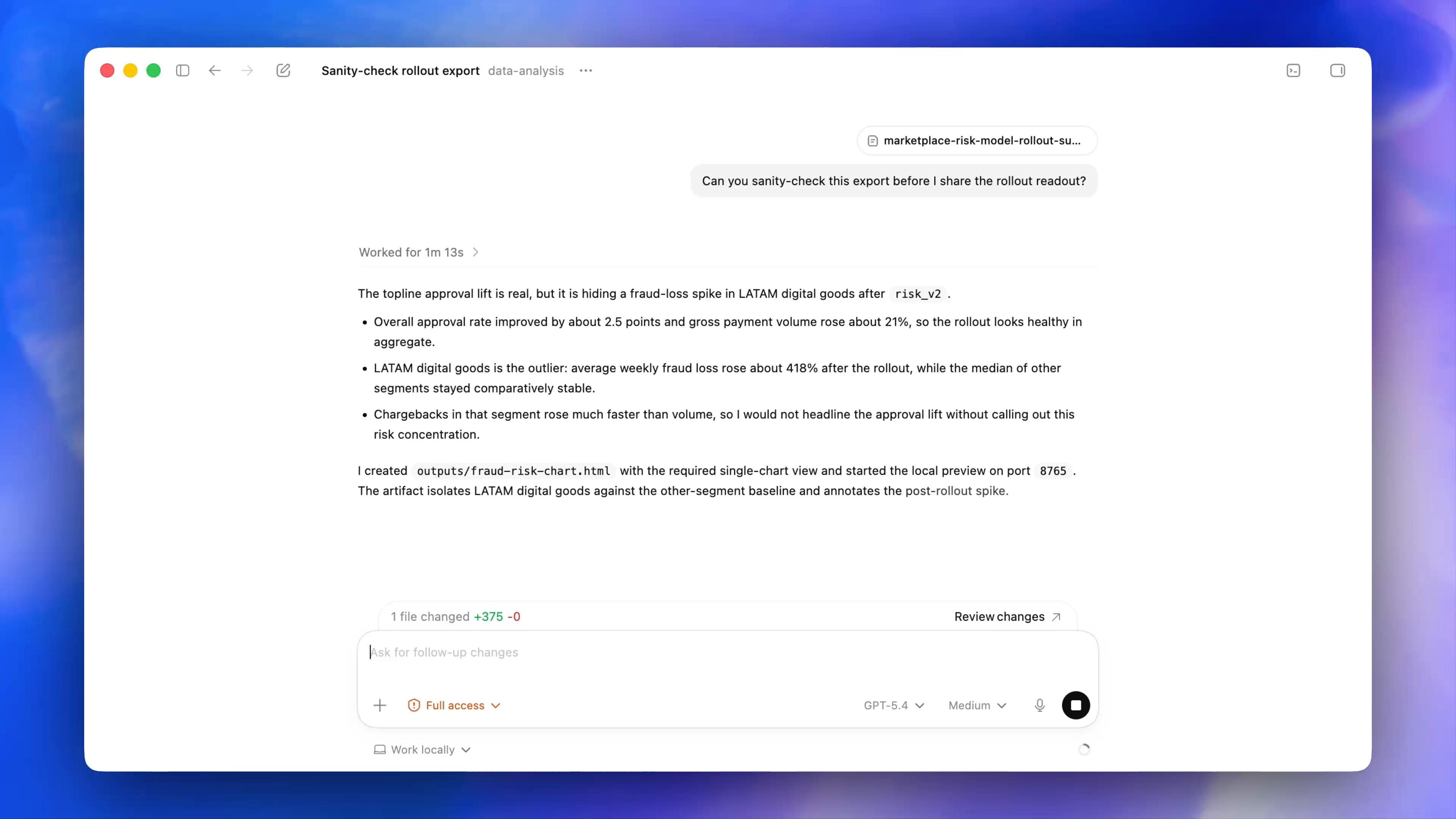
Figure 1-10A · CUR-01-12-01. The current official desktop demonstration showsMediumto the right of the composer alongside the model, permission, and Work locally controls. It only demonstrates the relationship of current controls;Mediumin the screenshot is not a recommendation or availability guarantee for your account.
Record the original wording before choosing
If your interface says “light / medium / high / extra high / max” rather than English, your learning record should include: the app product (Chat, Work, or Codex), original label, current model name, date, and task type. Then a future menu rename will not erase what you compared.
This table directly answers “what is the difference between Max and Extra High?”: distinguish their product meanings first. Extra High remains a regular reasoning tier for one task; Max gives a selected model more reasoning time; Ultra uses multiple subagents for divisible work. They may all cost more time and usage, but they are not the same knob.
If you cannot see Max, do not treat its absence as an installation failure or change configuration at random; first check current settings, workspace, and availability. The current official model page gives Ultra’s visible toggle as Settings > Configuration > Ultra in model picker slider. That is an entry-point fact, not a reason for Chapter 01 to recommend enabling Ultra now.
Why “higher” does not mean “better”
Longer reasoning usually costs more time and usage. It may improve exploration, checking, and constraint-following for a complex problem, or it may merely make a simple task wait longer. The current desktop model guide recommends starting with default / Medium and increasing only when the task needs deeper planning or analysis; reserve Max for the hardest single problem and Ultra for large work that can be split meaningfully. Models
Follow along: a reasoning-effort selection ladder
- Fast/default: concept explanations, short summaries, checklists, and low-risk drafts. The goal is to verify that the task card is clear.
- Medium: understanding multiple constraints, structured organization, or an initial analysis. Use it first as the balanced starting point for a complex task.
- High or higher: there is evidence that insufficient reasoning caused factual confusion, missed constraints, or a failed complex-code explanation.
- Extra High / Max: try only when you can state “the problem is hard and the quality gain is worth extra wait and usage”; leave a comparison record after every trial.
- Ultra: first write the separable subproblems, each subproblem’s output, and the final human-acceptance point; otherwise do not enable it.
Running case: do not change two variables at once
When comparing the North Shore Reading Club task, the two practices below produce different evidence quality:
| Practice | What it can establish | What it cannot establish |
|---|---|---|
| Same model and prompt; change only Medium to High. | Whether longer reasoning improved factual boundaries on this occasion. | Whether another model is better. |
| Change Sol, change to High, change the prompt, and add files at the same time. | Only a new result. | Which factor caused the quality change. |
Minimum exercise and acceptance
Write one rule for “when I will increase from my current effort tier”.
Reference-answer example: “Only when the same task has a describable factual error or missed constraint, and I can compare using the same material, prompt, and acceptance table, will I increase by one effort tier.” Common pitfall: treating max, Ultra, and Extra High as synonyms, or treating a higher tier as the permanent default. Next: understand usage: the cost of reasoning tiers appears in actual limits.